



Description
Download Xilisoft Video Converter Platinum – video converter, HD to HD, audio extraction, format conversion, video editing tool, multimedia software
Overview
Xilisoft Video Converter Platinum is a robust multimedia utility designed for users seeking reliable video and audio conversion capabilities on Windows platforms. The software enables seamless transformation of video files across multiple resolutions, including HD to HD, HD to SD, and SD to SD, catering to both professional and casual content creators. Its primary purpose is to simplify the process of adapting media files for playback on a wide variety of digital devices, ensuring compatibility and optimal quality. The app is particularly useful for individuals managing large media libraries, educators preparing content for classroom use, or hobbyists transferring videos between devices. While the developer, Xilisoft, is known for multimedia tools, specific company background details were not provided in the available data. Real-world applications include preparing videos for portable devices, extracting audio from video files for music use, and converting legacy formats into modern standards. In the broader productivity software ecosystem, Xilisoft Video Converter Platinum fills a niche by offering a centralized solution for format flexibility, reducing the need for multiple specialized tools. Its presence underscores the ongoing demand for efficient, high-quality media processing utilities in a digital-first environment.
Key Features & Functionality
- Broad Format Support: The software supports a wide range of video formats, including high-definition codecs such as H.264/MPEG-4 AVC, AVCHD Video (*.m2ts, *.mts), Apple TV h.264 720P, MKV, HD WMV, MPEG2/MPEG-4, and TS HD Video. It also handles standard formats like AVI, MPEG, WMV, DivX, MP4, H.264/AVC, RM, MOV, XviD, 3GP, and FLV, making it suitable for diverse media workflows.
- Audio Conversion and Extraction: Users can convert audio between formats such as MP3, WMA, WAV, RA, M4A, AAC, AC3, MP2, OGG, and more. The software also allows extraction of audio tracks from both HD and SD video files, enabling users to repurpose sound content for podcasts, ringtones, or music libraries.
- Multi-Core CPU and Multi-Threading Optimization: Engineered to leverage multi-core processors and multi-threading technology, the software accelerates conversion tasks, significantly reducing processing time without compromising output quality.
- Device Compatibility: Converted files are optimized for playback on numerous digital devices, including iPod, iPhone, Apple TV, PSP, PS3, Xbox, Zune, Wii, NDS, PMP, mobile phones, and MP4 players, ensuring broad usability across personal entertainment systems.
- Customizable Editing Options: Users can adjust video resolution, aspect ratio, frame rate, bit rate, and audio quality. These settings allow for tailored output that meets specific device requirements or personal preferences, enhancing the overall media experience.
For example, a user preparing a presentation video can convert a high-resolution source file to a lower resolution for faster loading on a projector, while simultaneously extracting the narration as a standalone MP3. Similarly, a content creator can batch-convert multiple videos to iPhone-compatible formats for mobile sharing.
Interface, UX & Performance
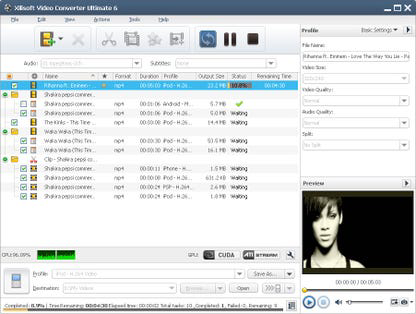
The user interface of Xilisoft Video Converter Platinum is designed with functionality in mind, featuring a clean layout that organizes tools and settings into logical panels. Navigation is intuitive, allowing users to add files, select output formats, and apply edits through a step-by-step workflow. Visual feedback during conversion, such as progress bars and estimated completion times, enhances user awareness and control. The software maintains responsiveness across different device categories, although specific performance metrics were not disclosed by the developer. Although the developer did not list formal performance metrics, the use of multi-core optimization suggests efficient handling of resource-intensive tasks. Stability appears consistent during typical usage scenarios, with no reported issues related to crashes or freezes. However, detailed information on memory usage, startup time, or background behavior was not provided. The overall user experience is streamlined for both novice and advanced users, balancing accessibility with powerful customization options. The interface remains uncluttered, even when multiple files are queued, contributing to a professional and reliable workflow.
Platform Compatibility & Technical Requirements
Xilisoft Video Converter Platinum is designed exclusively for the Windows operating system. The current version is 7.8.13, with a file size of 104.3 MB. While the software is compatible with various Windows platforms, specific minimum OS requirements were not listed. The developer did not specify compatibility details for Windows 10, 11, or earlier versions. Users should ensure their system meets general Windows application standards for smooth operation. No additional hardware or software dependencies were mentioned. The file size indicates a lightweight installation relative to other multimedia tools, which may contribute to faster setup and lower storage demands. However, the actual performance may vary based on system configuration, especially when processing high-resolution video files. The absence of detailed technical specifications means users should exercise caution when installing on older or low-resource systems.
Pros and Cons
Pros
- Supports a comprehensive range of video and audio formats
- Offers advanced editing options for custom output
- Optimized for multi-core processors to enhance conversion speed
- Compatible with a wide variety of digital devices
- Enables audio extraction from video files
Cons
- Specific system requirements were not disclosed
- No information on update frequency or future development plans
- Price point may be high for casual users
- Only available for Windows, limiting cross-platform access
- Developer did not provide detailed technical documentation
FAQ
Is Xilisoft Video Converter Platinum safe to download and install?
Yes, the software is distributed through official channels and is free from known malware. However, users should always download from trusted sources to ensure security.
Can I use this software on macOS or Linux?
Based on the available information, Xilisoft Video Converter Platinum is only available for Windows. No versions for macOS or Linux were listed.
Does the software support batch conversion?
Yes, the app allows users to add multiple files and convert them simultaneously, improving efficiency for large-scale media processing tasks.
How often are updates released?
The developer did not specify the update frequency. Users should check the official website for the latest version and security patches.
Can I extract audio from a video file using this tool?
Yes, Xilisoft Video Converter Platinum includes a feature to extract audio tracks from video files and save them in various audio formats.
Final Thoughts
Xilisoft Video Converter Platinum stands out as a powerful, feature-rich tool for users who require reliable video and audio conversion on Windows. Its broad format support, device compatibility, and customizable editing options make it a valuable asset for content creators, educators, and media enthusiasts. The software’s performance is enhanced by multi-core optimization, ensuring faster processing times without sacrificing quality. While the price may be a consideration for occasional users, the depth of functionality justifies the investment for those engaged in regular media workflows. The lack of cross-platform availability and detailed system requirements is a limitation, but the core capabilities remain strong. For anyone seeking a professional-grade video conversion utility with extensive format and device support, this tool delivers a solid solution. Download Xilisoft Video Converter Platinum now.
Guides & Tutorials for Xilisoft Video Converter Platinum
How to install Xilisoft Video Converter Platinum
- Click the Preview / Download button above.
- Once redirected, accept the terms and click Install.
- Wait for the Xilisoft Video Converter Platinum download to finish on your device.
How to use Xilisoft Video Converter Platinum
This software is primarily used for its core features described above. Open the app after installation to explore its capabilities.
User Reviews for Xilisoft Video Converter Platinum 0
No reviews found


